Project Design
Welcome to the design document for soso! This document provides an in-depth overview of the architectural design, key components, and design principles behind our work. It aims to enhance your understanding of our project’s design philosophy and empower you to contribute effectively.
We encourage you to explore this document and reach out with any questions or suggestions. Your feedback is invaluable as we continuously improve and evolve our project.
Introduction
This software converts scientific metadata standards into Science On Schema.Org (SOSO) JSON-LD, which can be embedded in the landing pages of data repository datasets for harvesting by search engines (like Google) and other applications.
Currently, most repositories have their own implementations, however, a shared implementation offers some advantages:
Facilitates the adoption of SOSO conventions through an intuitive application.
Promotes community-wide consistency by providing a standardized approach to metadata conversion.
Simplifies updates to SOSO records as standards and conventions evolve, ensuring that dataset metadata remain current and interoperable.
Functional design requirements we considered in the development of this application:
Support a wide range of metadata standards for conversion to SOSO format.
Handle various schema versions within supported metadata standards.
Offer customization options to accommodate unique use cases.
Non-functional design requirements we considered:
The application should be intuitive for novice users.
Meets performance requirements for batch conversion or real-time updates of metadata records in data repositories.
Test each conversion strategy against a consistent set of pre-defined criteria.
Architecture
The system architecture implements the Strategy Pattern, a behavioral design pattern that allows us to define a set of algorithms for converting metadata, encapsulate each one, and make them interchangeable. This pattern enables the client code to choose an algorithm or strategy at runtime without needing to know the details of each algorithm’s implementation. This flexibility applies not only to metadata conversion but also to a test interface implementing a consistent set of checks.
Implementation Overview:
Strategy Interface (src/soso/interface.py): This interface declares a method signature that all modules must implement, serving as a common contract between modules. We’ve structured the methods around the creation of SOSO properties, since these are conceptually understandable and contained.
Strategies (src/soso/strategies/): These strategies are classes that implement the interface and are organized into different modules. Each module may include additional utility functions to aid implementation.
Context (src/soso/main.py): The primary client-side logic manages the main workflow. The user’s chosen strategy is instantiated dynamically at runtime, with additional inputs such as the metadata document and any relevant information used by the strategy implementation.
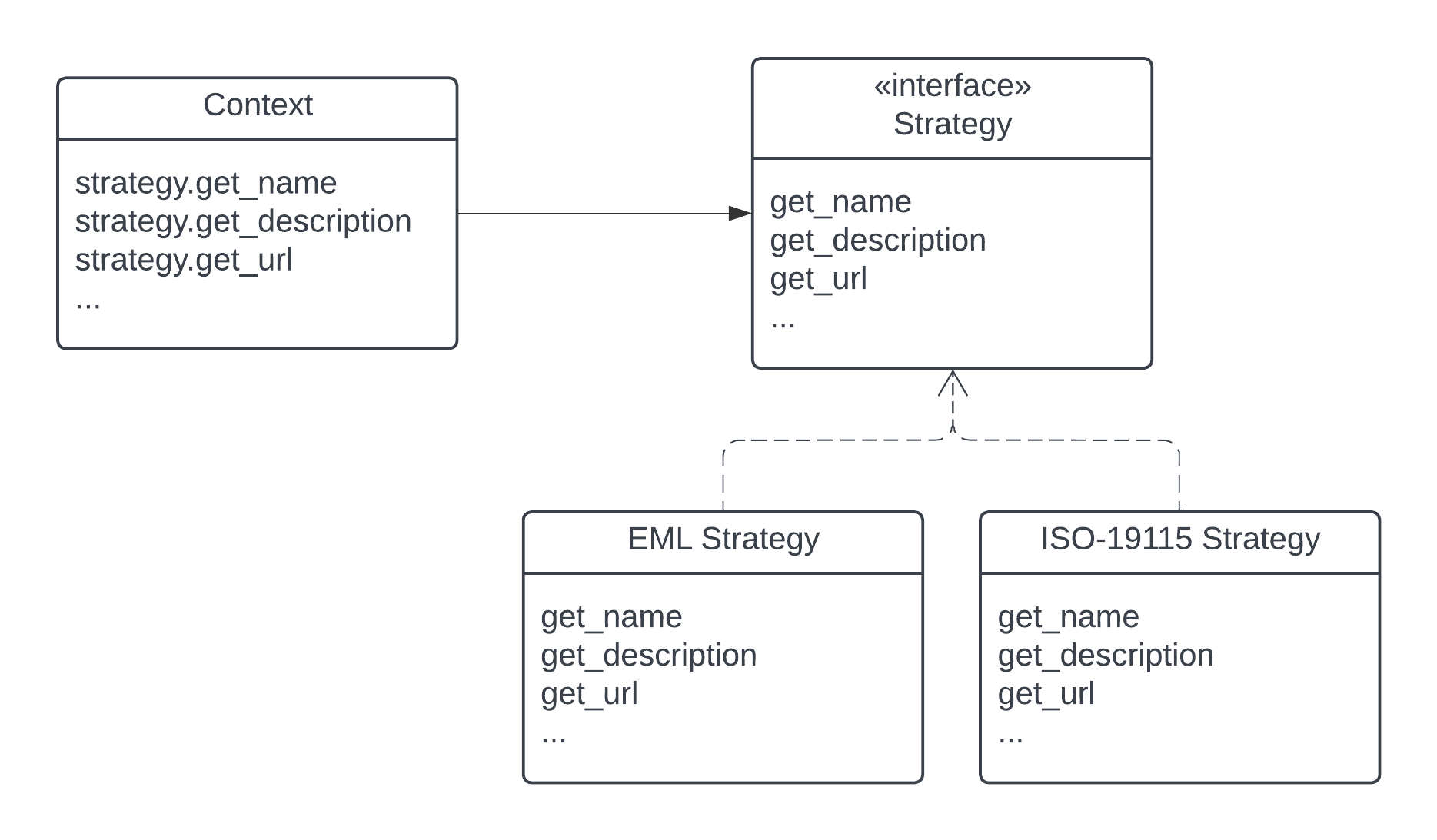
With this pattern, new support for metadata standards or versions can be easily added as strategy modules without modifying the client code or test suite.
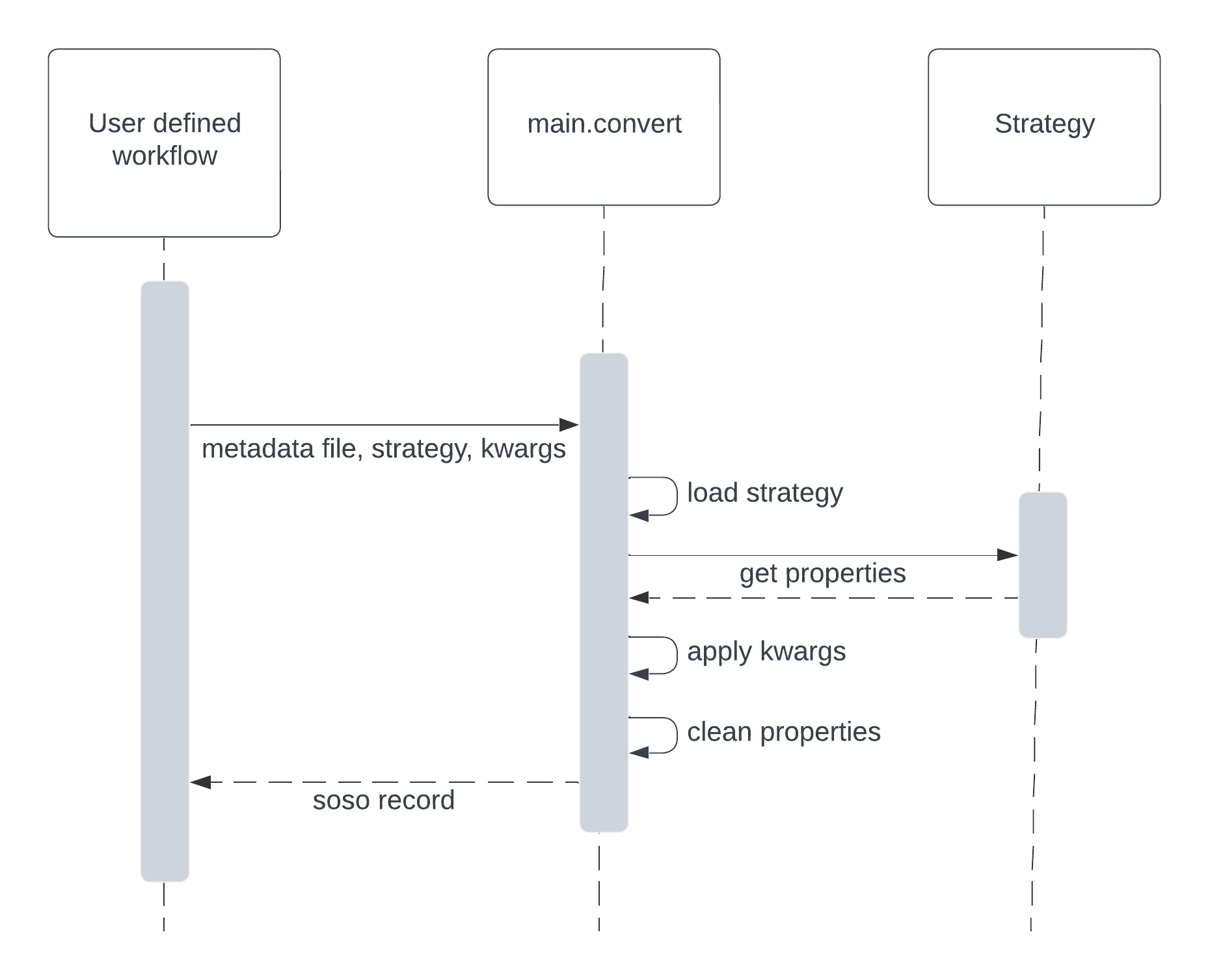
Users typically define workflows that iterate over a series of metadata files. For each file, along with its corresponding strategy and any unmappable properties expressed as kwargs, users invoke convert, which then returns a SOSO record.
Metadata Mapping
We utilize the Simple Standard for Sharing Ontological Mappings (SSSOM) for semantic mapping metadata standards to SOSO. SSSOM provides a framework for expressing the match precision and other essential information to guide developer implementations.
We apply SSSOM following SSSOM guidelines, with some nuanced additions tailored to the project’s needs. One such addition is the inclusion of a subject_category column, which aids in grouping and improving the readability of highly nested subject_id values. Additionally, we’ve formatted subject_id values using an arbitrary hierarchical path-like expression, enhancing clarity for the reader in understanding which property is being referenced. Note, while this path is human-readable, it is not machine-actionable.
Beyond these general differences, each metadata standard’s mapping may have unique nuances that should be considered. These are documented in each metadata standard’s SSSOM.yml file, located in the src/soso/strategies/{strategy}/ directory, where {strategy} is the acronym of the metadata standard.
Creating or updating a metadata standard’s SSSOM files involves subjectively mapping properties. To mitigate subjectivity, we’ve established a set of Predicate Mapping Guidelines. Additionally, we recommend having a second set of eyes review any mapping work to identify potential biases or misunderstandings. The original mapping creator is listed in the SSSOM and can serve as a helpful reference for clarification.
Before committing any changes to SSSOM files, it’s a good practice to thoroughly review them to ensure unintended alterations haven’t been made to other parts of the SSSOM files. Given the file’s extensive information and nuanced formatting, careful attention to detail is important.
Predicate Mapping Guidelines
SSSOM guidelines form the basis of our predicate mapping guidelines. However, we broaden property definitions to include their data types, not only their descriptions. We do this because data types matter to JSON-LD parsers and Schema.org semantics. Therefore, two key factors inform the selection of a mapping predicate: property definition and property type.
Definitions: Definitions represent the underlying semantic meaning of a property, discerned by understanding the definitions of the properties being mapped.
Types: Types denote the data types in which properties are expressed. Types often adhere to a hierarchy, for example:
Text > URL > URI > IRI (e.g., Text is broader than URL, and URL is broader than URI)
Text > Numeric > xsd:decimal (e.g., Text is broader than Numeric, and Numeric is broader than xsd:decimal)
schema:Date > schema:DateTime (e.g., schema:Date is broader than schema:DateTime)
It’s important to note that Schema.org properties can accept a range of data types. However, SOSO provides recommendations for these data types, categorized as “preferred” and “acceptable.” When mapping data to SOSO, prioritize using the “preferred” data type whenever possible, and fall back to “acceptable” types only if necessary.
We’ve categorized mapping predicates into two groups to expedite definition selection.
When Definitions Match: Consider these predicates:
skos:exactMatch: Definitions and types match precisely.
skos:narrowMatch: Definitions match, but object type is narrower.
skos:broadMatch: Definitions match, but object type is broader.
When Definitions Don’t Match: Use these predicates:
skos:closeMatch: Definitions don’t match, but are close. Object type may or may not match.
skos:relatedMatch: Definitions don’t match, but broadly align with an analogous concept in a different category. Object type may or may not match.
When a mapping can’t be established, use skos:exactMatch for the property value and sssom:NoMapping for the object value.
Mapping Implementation
This section outlines the conditions for implementing a mapping in code. Our goal is to maintain the fidelity of the semantic information within the metadata by ensuring an exact match between the two schemas.
Conditions for Implementing a Metadata Mapping
Exact Match: The subject and object values in the mapping form a skos:exactMatch as defined in the SSSOM file.
Transformable Match: The subject and object values in the mapping form a skos:narrowMatch or skos:broadMatch but the object value(s) can be transformed to achieve a skos:exactMatch. Note, in such cases, do not declare them as a skos:exactMatch in the SSSOM file, instead, add a note to the comment field to alert developers.
Testing
The test suite utilizes the strategy design pattern to implement a standardized set of checks that all strategies must undergo (tests/test_strategies.py). It verifies that returned property values (resource types and data types) adhere to SOSO conventions. It ensures that null values (e.g., “”) or containers (e.g., []) are not returned, thereby reducing the accumulation of detritus in the resultant SOSO record. Additionally, verification tests against snapshots of full SOSO records help check the consistency of inputs and outputs produced by the system (tests/test_main.py).
Setting up tests for a new strategy requires only creating a strategy instance, essentially a metadata record read into the strategy module, and running through each method test in the test_strategies.py module. To test negative cases, an empty metadata record is used. This helps ensure that strategy methods correctly handle scenarios where the metadata record lacks content.
Strategy-specific utility functions are tested in their own test suite module named test_[strategy].py. General utility functions used across different strategies are tested in test_utilities.py.
Schema Versioning
To ensure compatibility with multiple versions of supported metadata standards, soso employs a schema version handling mechanism. During conversion:
The conversion strategy parses the schema version information directly from the metadata record itself.
This extracted information is then stored as an attribute within the strategy.
Conversion methods for individual properties can access this attribute allowing the flow control logic within the conversion process to leverage the schema version.
Based on the identified version, the logic applies specific processing rules.
This approach ensures that even backward-incompatible changes introduced between schema versions are handled gracefully, maintaining overall conversion success.
Customization
The Strategy Pattern employed in this application enables a high degree of user customization to solve common challenges:
Properties that don’t map from a metadata standard but require external data, such as dataset landing page URLs.
Properties requiring custom processing due to community-specific application of metadata standards.
These cases can be addressed by providing information as kwargs to the convert function, which overrides properties corresponding to kwargs key names, or by applying any additional modifications to the resulting JSON-LD. For further details, refer to the user Quickstart.
Setting Up a New Metadata Conversion Strategy
This section provides a high-level overview of the steps involved in implementing a new metadata conversion strategy. Detailed information can be found in the dedicated sections on Project Design and EML provides a good reference implementation.
Steps:
Metadata Mapping:
Define how the source metadata standard translates to the SOSO format.
Create mapping files in SSSOM format and place them in src/soso/strategies/{strategy}/.
Metadata for Tests:
Create a complete metadata record for testing the conversion strategy in src/soso/strategies/{strategy}/.
Include an empty metadata record for testing negative scenarios as well.
Connect Metadata to Test Suite:
Instantiate your new strategy class for use in the test suite.
Update tests/conftest.strategy_names fixture to include the acronym of the metadata standard in the returned list.
Update Utility Functions:
Modify the utilities.get_example_metadata_file_path and utilities.get_empty_metadata_file_path functions with elif clauses to handle the new metadata standard and return the appropriate file paths.
Update Test Fixtures:
Add your strategy class name to the list of params in the @pytest.fixture decorator of tests/conftest.strategy_instance.
Implement an elif clause to return the new strategy class instance based on its name in the fixture.
Repeat the same for tests/conftest.strategy_instance_no_meta.
Skip Undeveloped Tests (Optional):
If specific property methods haven’t been developed yet, you can temporarily skip their tests by following the skipping guidelines documented in tests/test_strategies.py.
Develop Conversion Strategy:
Create a new module in src/strategies/ named after the metadata standard.
Implement the conversion strategy methods one by one within this directory, starting with stubs.
As you develop each method, remove the corresponding skip decorator from the related test case in tests/test_strategies.py to ensure testing.
We advocate for property methods that return useful content. Calling the utilities.delete_null_values function, before returning results, helps with this.
Use the guess_mime_type_with_fallback utility for all filename-based MIME lookups to ensure cross-platform consistency.
Verification Tests:
Add a snapshot of the expected SOSO record generated by convert to tests/data/{strategy}/ for verification tests.
Testing:
Run the test suite to ensure all functionalities work as expected.
Utility Functions (Optional):
Define any helper functions needed specifically for the strategy at the bottom of the strategy module.
Test these functions in the dedicated strategy test module located at tests/test_[strategy].py.
Alternative Implementations Considered
Before settling on the Strategy Pattern as the design for this project, we considered the use of JSON-LD Framing. This approach involves converting a metadata record to JSON-LD, applying a crosswalk to obtain equivalent SOSO properties, and structuring the result with a JSON-LD Frame (e.g., EML.xml => EML.jsonld => crosswalk => Frame.jsonld => SOSO.jsonld).
The benefits of the JSON-LD Framing approach include ease of extension to other metadata standards through the creation of new crosswalks and simplified maintenance, as modifications are primarily made to the crosswalk file. However, this approach has its downsides. Some metadata standards cannot be serialized to JSON-LD, necessitating additional custom code. Additionally, when dealing with metadata standards with nested properties, framing results in information loss, as framing works best for flat sets of properties.
Ultimately, we determined that the potential loss of information during conversion outweighed the benefits of simplified maintenance.